 | Home Page | Why Free | Contact |
This site is hosted by CyberGate
Web Hosting "The quality site begins here!"
 Keep It Alive | Introduction | Download | Help | FAQs |
- Introduction
- Installation
- Features
- Options
Introduction
Keep It Alive is an easy-to-use program for keeping a dial-up
Internet connection alive. It is a fact that many ISPs disconnect
their clients dial-up connections if they are not active for a
certain period of time. Keep It Alive keeps your dial-up
connection alive by trying to get a web page in every a few
minutes.
Installation
- This program is for Windows PC. There is no version for
Mac.
- If you have a previous version of
Keep It Alive installed and running, exit the program
first.
- Unzip the downloaded file to a temporary folder (with a
decompressing program such as winzip from www.winzip.com)
and run setup.exe to install.
- To uninstall, use Add/Remove Programs in Control Panel.
KIA is a stand-alone program. It gets web page itself in the
background. The web content it received is discarded and will not
be shown in your browser, unless you choose the option "let
my browser get a web page". It doesn't matter what browser
you use. The program uses very little of you computer CPU time
and memory.
Features
- It will detect whether you are connected to the Internet
or not . Once you are connected it will automatically
start taking its "keeping alive" actions -
trying to get a web page every several minutes, and stop
actions when you disconnect.
- The program only appears as a small icon in the Windows
system tray
 and does its keeping alive job in the background or waits
there for your Internet connection..
and does its keeping alive job in the background or waits
there for your Internet connection..
- Point your mouse to the tray icon, you will see your
connection status.
- Double click the icon, the main
window will show.
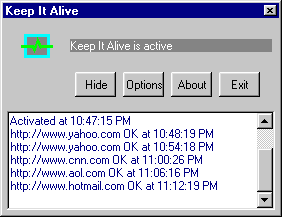
- Right click your mouse on the icon, a popup menu will
show.
Options

- Online detecting
- KIA is supposed to know whether you are online or not,
and to take keeping alive actions when you are online and
to keep quiet when you are not. If you are offline but
the KIA icon is still blinking and trying to connect,
select a different online/offline detecting method. If
both methods failed, use the manual option. After you are
connected, right click the KIA icon, select Start; before
you disconnect, right click the KIA icon and select Stop.
- Action
- Different levels of Keeping alive actions, from just ping
to full simulation of your web surfing activity. Web page
received is erased after an action is completed. You can
also choose the option "let my browser get a web
page".
- Interval
- This interval can be set within 1-99 minutes using up/down
arrow. Most ISPs have idle timer 10-15 minutes. A few
minutes keeping alive interval should be good.
- Web list
- You can enter a web page address with or without http://
part. You can even enter an IP address. To add an
address, type it in the right line edit box, then press
enter or click Add button. To remove an address, select
it in the list, and then press Delete key or click Remove
button.
- Proxy
- Most people don't need this. Tick this only when you are
sure what you are doing.
- Sound
- A simple sound will play when an action is done, and you
will also see the trayicon has white flash.
- Timer
- This is only to halt keeping alive actions, not to
physically disconnect your line. When enabled, working
hour value can be set within 1-24 using up/down arrow. A
single click of the KIA trayicon will resume the action.
- Startup
- This gives your choice whether to start Keep It Alive
automatically when Windows boots up.
Keep It Alive | Introduction | Download | Help | FAQs |
SendTo FTP | Introduction | Download | Help | FAQs |